Open app.perp.ag and click Login. The Perp.ag Telegram bot opens; start it and it
sends you back to the app, signed in. There is no wallet-connect login: your Telegram account is your
Perp.ag account. See Login and alerts.
2
Fund an account on the venue you want to trade
Go to Accounts. Each venue has its own section. If you have no account there yet, click
Deposit to open account: your first deposit opens your main account. Lighter, Jupiter, Phoenix,
Bullet and Aftermath settle in USDC; RH Lighter settles in USDG on Robinhood Chain. See
Accounts for the per-venue details.
3
Find a trader
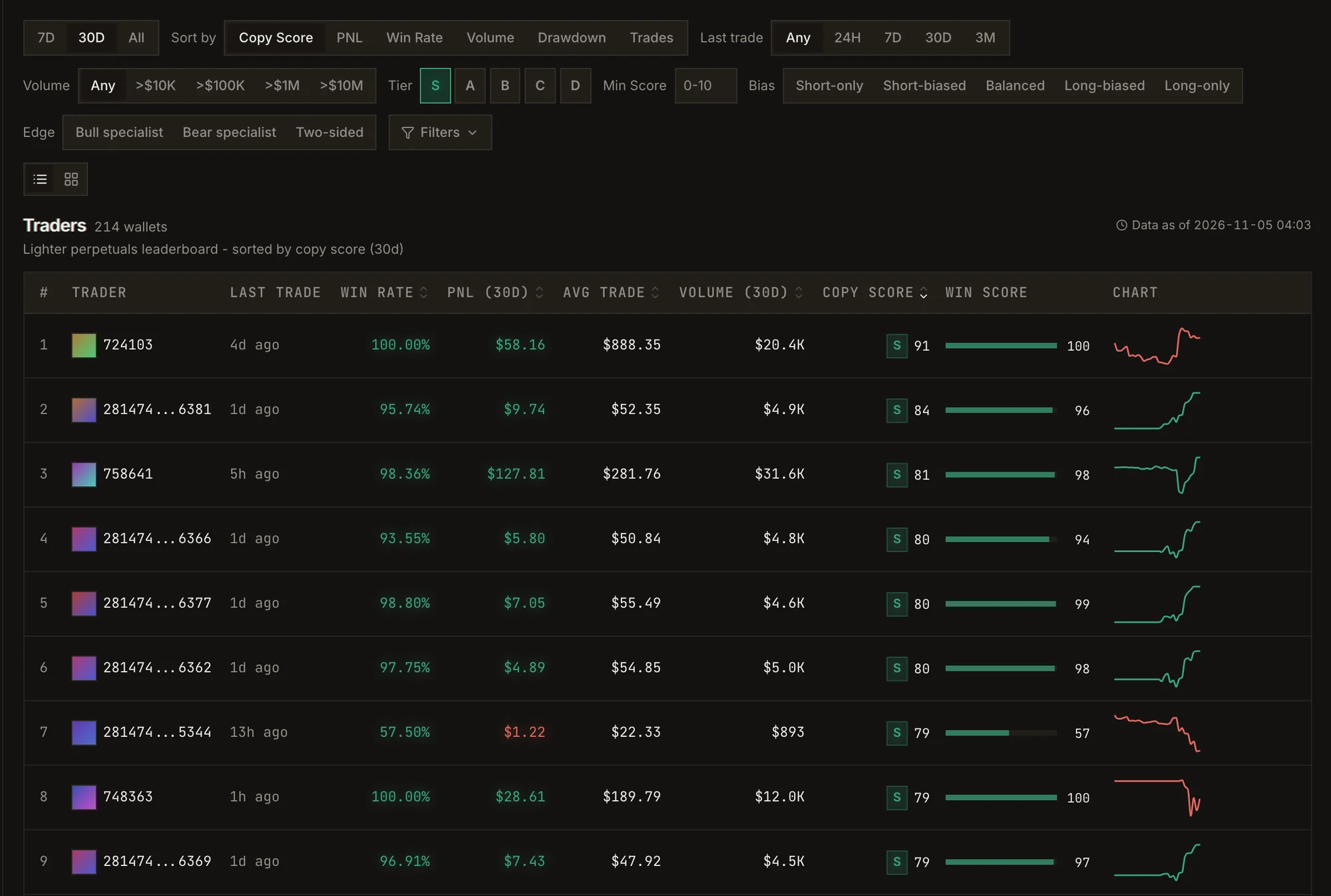
Open Explore. Sort by Copy Score, filter by tier, bias, edge, volume and last trade, or browse
the cohorts and the Best Wallets to Copy Trade list. Click a wallet to open its profile. See
Explore.
The leaderboard, filtered to S-tier wallets and sorted by Copy Score.
4
Test them first (recommended)
On the trader’s profile, click Backtest to replay their history against your settings, or
Paper Copy to follow them with virtual money from now on. See Paper copy.
5
Start copying
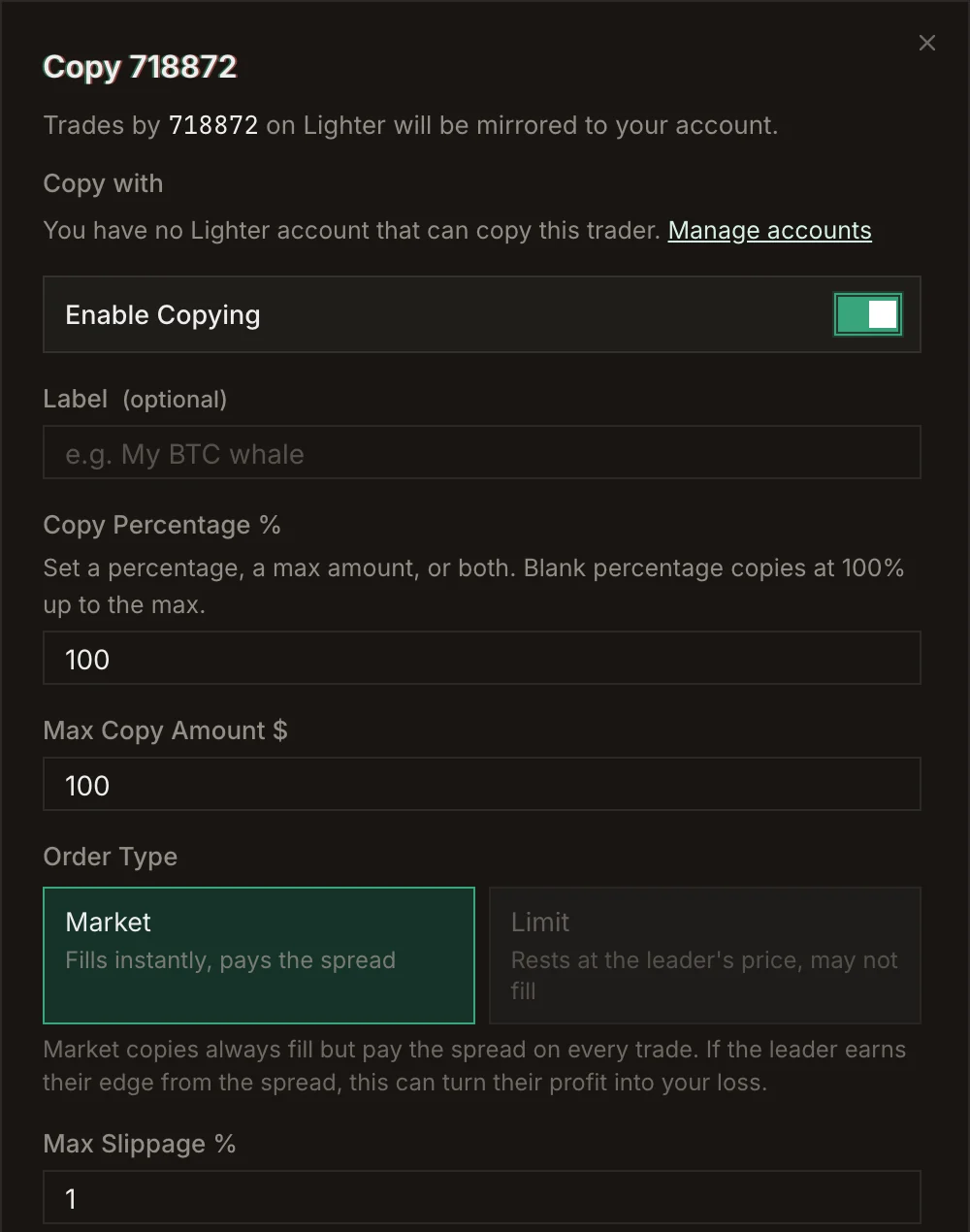
Click Copy Trade on the profile. Pick the account to Copy with, set your size (a copy percentage,
a max amount, or both), leverage, take profit, stop loss and slippage, then click Start Copying.
See Copy trading.
The copy form.
6
Set a breaker
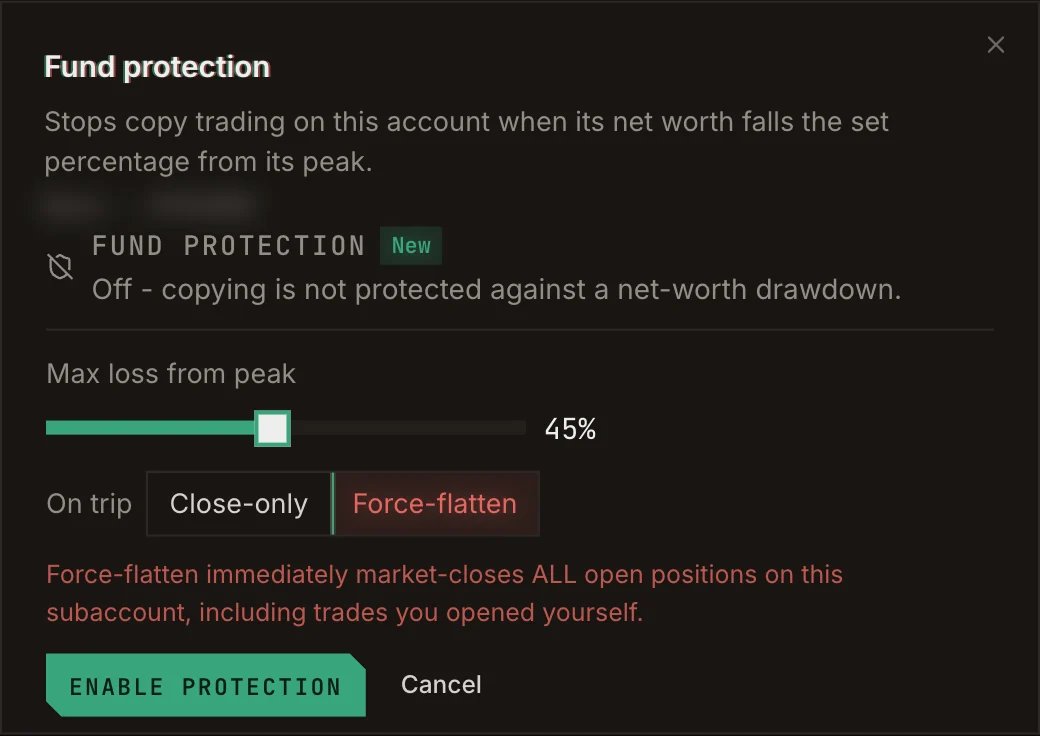
In Accounts, turn on Fund protection for the account. If its net worth falls the percentage you
choose from its peak, copying on it stops. See Fund protection.
The fund protection setting.
7
Watch it run
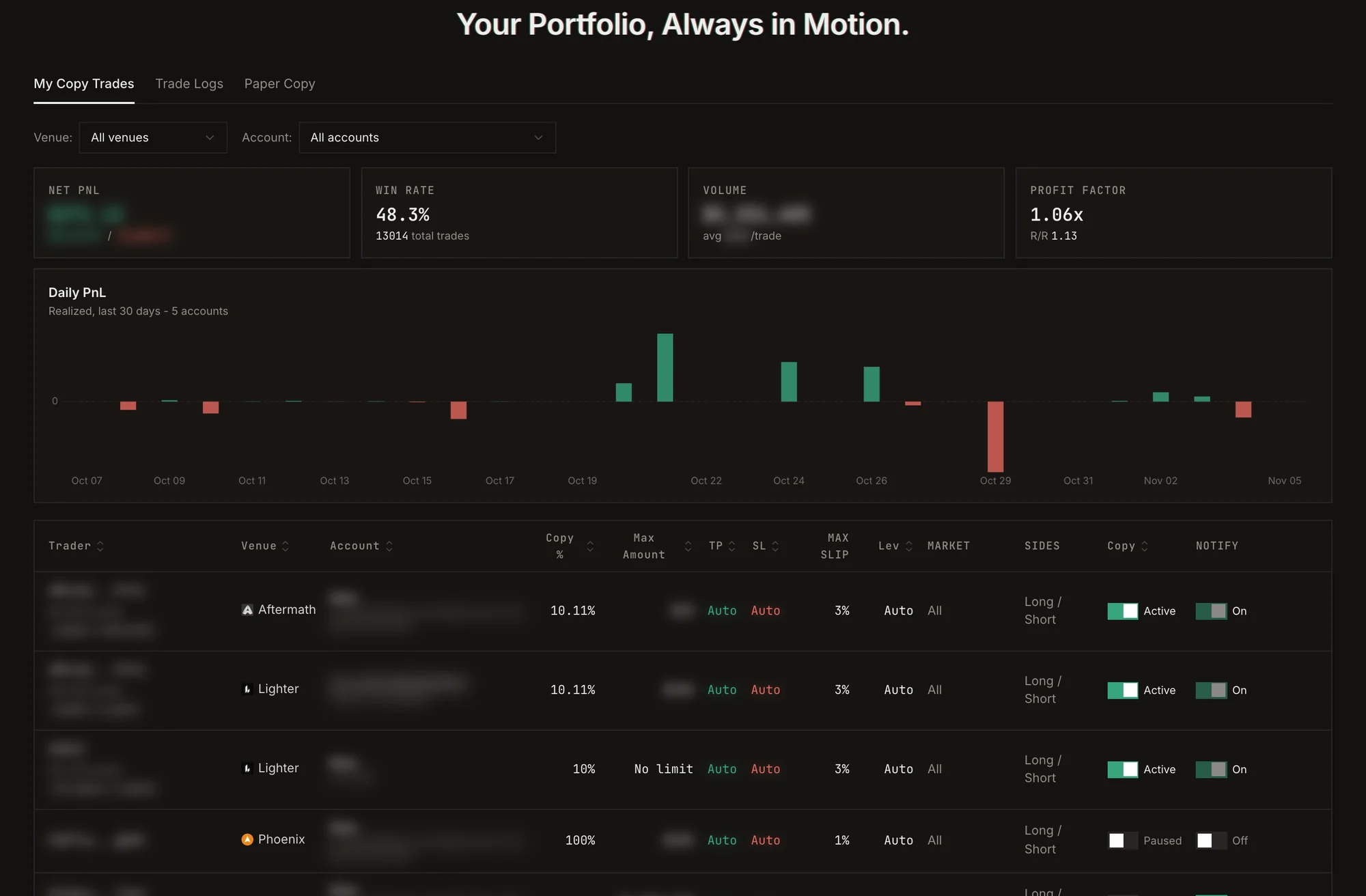
Copy Trade → My Copy Trades shows each copy’s settings and your daily realized PnL. Trade Logs
lists every copied order and its status. Turn on Notify on trade to get an alert for each one.
My Copy Trades.
⌘I
{"docsConfig":{"theme":"linden","$schema":"https://mintlify.com/docs.json","name":"Perp.ag Docs","description":"Guide to the Perp.ag app and documentation for the Perp.ag Data API: trader analytics for Lighter, RH Lighter, Jupiter, Phoenix, Bullet and Aftermath.","colors":{"primary":"#38a67c","light":"#38a67c","dark":"#2a7d5d"},"logo":{"light":"/logo/light.svg","dark":"/logo/dark.svg","href":"https://perp.ag"},"favicon":"/favicon.svg","api":{"playground":{"display":"simple"},"examples":{"languages":["bash","javascript","python"]}},"appearance":{"default":"dark"},"background":{"color":{"light":"#f9fcfb","dark":"#141210"}},"navbar":{"primary":{"type":"button","label":"Open app","href":"https://app.perp.ag"}},"footer":{"socials":{"x":"https://x.com/perp_ag","website":"https://perp.ag"}},"fonts":{"heading":{"family":"Space Grotesk","weight":600},"body":{"family":"Inter"}},"integrations":{"telemetry":{"enabled":false}},"navigation":{"pages":[]}},"deployment":{"deploymentMetadataValue":{"hasAudioNarration":false,"customDomains":[],"gitSource":{"type":"github","owner":"local","repo":"local","deployBranch":"main","contentDirectory":"","isPrivate":true,"mountPath":"","label":"local","isBase":true},"buildId":"local","clientVersion":"0.0.4068"},"basePath":"","hasChatPermissions":false,"hasWebMcpPermissions":false,"toggles":[],"googleFontsInlined":true,"isLoggedInCli":false,"mintExport":{}},"customCss":[],"page":{"pagePath":"quickstart","slug":"/quickstart","pageMetadata":{"title":"Quickstart","description":"From sign-in to your first copy trade.","href":"/quickstart"},"description":{"compiledSource":"\"use strict\";\nconst {jsx: _jsx} = arguments[0];\nconst {useMDXComponents: _provideComponents} = arguments[0];\nfunction _createMdxContent(props) {\n const _components = {\n p: \"p\",\n ..._provideComponents(),\n ...props.components\n };\n return _jsx(_components.p, {\n children: \"From sign-in to your first copy trade.\"\n });\n}\nfunction MDXContent(props = {}) {\n const {wrapper: MDXLayout} = {\n ..._provideComponents(),\n ...props.components\n };\n return MDXLayout ? _jsx(MDXLayout, {\n ...props,\n children: _jsx(_createMdxContent, {\n ...props\n })\n }) : _createMdxContent(props);\n}\nreturn {\n default: MDXContent\n};\n","frontmatter":{},"scope":{}},"pageType":"default","mdx":{"mdxSource":{"compiledSource":"\"use strict\";const{jsx:_jsx,jsxs:_jsxs}=arguments[0];const{useMDXComponents:_provideComponents}=arguments[0];function _createMdxContent(props){const _components={a:`a`,p:`p`,strong:`strong`,..._provideComponents(),...props.components},{Frame,OptimizedImage,Step,Steps}=_components;if(!Frame)_missingMdxReference(`Frame`,true);if(!OptimizedImage)_missingMdxReference(`OptimizedImage`,true);if(!Step)_missingMdxReference(`Step`,true);if(!Steps)_missingMdxReference(`Steps`,true);return _jsxs(Steps,{children:[_jsx(Step,{title:`Sign in with Telegram`,children:_jsxs(_components.p,{children:[`Open `,_jsx(_components.a,{href:`https://app.perp.ag`,children:`app.perp.ag`}),` and click `,_jsx(_components.strong,{children:`Login`}),`. The Perp.ag Telegram bot opens; start it and it\nsends you back to the app, signed in. There is no wallet-connect login: your Telegram account is your\nPerp.ag account. See `,_jsx(_components.a,{href:`/guide/login-and-alerts`,children:`Login and alerts`}),`.`]})}),_jsx(Step,{title:`Fund an account on the venue you want to trade`,children:_jsxs(_components.p,{children:[`Go to `,_jsx(_components.strong,{children:`Accounts`}),`. Each venue has its own section. If you have no account there yet, click\n`,_jsx(_components.strong,{children:`Deposit to open account`}),`: your first deposit opens your main account. Lighter, Jupiter, Phoenix,\nBullet and Aftermath settle in USDC; RH Lighter settles in USDG on Robinhood Chain. See\n`,_jsx(_components.a,{href:`/guide/accounts`,children:`Accounts`}),` for the per-venue details.`]})}),_jsxs(Step,{title:`Find a trader`,children:[_jsxs(_components.p,{children:[`Open `,_jsx(_components.strong,{children:`Explore`}),`. Sort by `,_jsx(_components.strong,{children:`Copy Score`}),`, filter by tier, bias, edge, volume and last trade, or browse\nthe cohorts and the `,_jsx(_components.strong,{children:`Best Wallets to Copy Trade`}),` list. Click a wallet to open its profile. See\n`,_jsx(_components.a,{href:`/guide/explore`,children:`Explore`}),`.`]}),_jsx(Frame,{caption:`The leaderboard, filtered to S-tier wallets and sorted by Copy Score.`,children:_jsx(OptimizedImage,{src:`/docs/images/guide/leaderboard.webp`,alt:`The leaderboard, filtered to S-tier wallets and sorted by Copy Score.`})})]}),_jsx(Step,{title:`Test them first (recommended)`,children:_jsxs(_components.p,{children:[`On the trader’s profile, click `,_jsx(_components.strong,{children:`Backtest`}),` to replay their history against your settings, or\n`,_jsx(_components.strong,{children:`Paper Copy`}),` to follow them with virtual money from now on. See `,_jsx(_components.a,{href:`/guide/paper-copy`,children:`Paper copy`}),`.`]})}),_jsxs(Step,{title:`Start copying`,children:[_jsxs(_components.p,{children:[`Click `,_jsx(_components.strong,{children:`Copy Trade`}),` on the profile. Pick the account to `,_jsx(_components.strong,{children:`Copy with`}),`, set your size (a copy percentage,\na max amount, or both), leverage, take profit, stop loss and slippage, then click `,_jsx(_components.strong,{children:`Start Copying`}),`.\nSee `,_jsx(_components.a,{href:`/guide/copy-trading`,children:`Copy trading`}),`.`]}),_jsx(Frame,{caption:`The copy form.`,children:_jsx(OptimizedImage,{src:`/docs/images/guide/copy-form-top.webp`,alt:`The copy form.`,style:{maxWidth:`460px`,margin:`0 auto`}})})]}),_jsxs(Step,{title:`Set a breaker`,children:[_jsxs(_components.p,{children:[`In `,_jsx(_components.strong,{children:`Accounts`}),`, turn on `,_jsx(_components.strong,{children:`Fund protection`}),` for the account. If its net worth falls the percentage you\nchoose from its peak, copying on it stops. See `,_jsx(_components.a,{href:`/guide/fund-protection`,children:`Fund protection`}),`.`]}),_jsx(Frame,{caption:`The fund protection setting.`,children:_jsx(OptimizedImage,{src:`/docs/images/guide/fund-protection.webp`,alt:`The fund protection setting.`,style:{maxWidth:`460px`,margin:`0 auto`}})})]}),_jsxs(Step,{title:`Watch it run`,children:[_jsxs(_components.p,{children:[_jsx(_components.strong,{children:`Copy Trade → My Copy Trades`}),` shows each copy’s settings and your daily realized PnL. `,_jsx(_components.strong,{children:`Trade Logs`}),`\nlists every copied order and its status. Turn on `,_jsx(_components.strong,{children:`Notify on trade`}),` to get an alert for each one.`]}),_jsx(Frame,{caption:`My Copy Trades.`,children:_jsx(OptimizedImage,{src:`/docs/images/guide/my-copy-trades.webp`,alt:`My Copy Trades.`})})]})]})}function MDXContent(props={}){const{wrapper:MDXLayout}={..._provideComponents(),...props.components};return MDXLayout?_jsx(MDXLayout,{...props,children:_jsx(_createMdxContent,{...props})}):_createMdxContent(props)}return{default:MDXContent};function _missingMdxReference(id,component){throw new Error(`Expected `+(component?`component`:`object`)+\" `\"+id+\"` to be defined: you likely forgot to import, pass, or provide it.\")}","frontmatter":{},"scope":{"config":{},"pageMetadata":{"title":"Quickstart","description":"From sign-in to your first copy trade.","href":"/quickstart"}}},"mdxSourceWithNoJs":null},"mdxExtracts":{"tableOfContents":[],"codeExamples":{}},"jsLinks":[],"subdomain":"localhost","siteName":"Perp.ag Docs","title":"Quickstart - Perp.ag Docs","navMaps":{"firstHrefInVersion":{},"firstHrefInLanguage":{}},"originalFileLocation":"quickstart.mdx"},"headHtml":"\u003cscript data-mint-head>(function(){var d=document.documentElement,p=null;if(!p){try{p=localStorage.getItem(\"isDarkMode\")}catch(e){}if(p==='true')p='dark';else if(p==='false')p='light';if(p!=='light'\u0026\u0026p!=='dark'\u0026\u0026p!=='system')p=\"dark\"}var r=p==='system'?(matchMedia(\"(prefers-color-scheme: dark)\").matches?'dark':'light'):p;d.classList.remove(r==='dark'?'light':'dark');d.classList.add(r);d.setAttribute(\"data-theme-preference\",p)})();\u003c/script>\u003cmeta data-mint-head name=\"description\" content=\"From sign-in to your first copy trade.\">\u003cmeta data-mint-head name=\"application-name\" content=\"Perp.ag Docs\">\u003cmeta data-mint-head name=\"generator\" content=\"Mintlify\">\u003clink data-mint-head rel=\"apple-touch-icon\" type=\"image/png\" sizes=\"180x180\" href=\"/docs/favicons/apple-touch-icon.png\">\u003clink data-mint-head rel=\"icon\" type=\"image/png\" sizes=\"32x32\" href=\"/docs/favicons/favicon-32x32.png\">\u003clink data-mint-head rel=\"icon\" type=\"image/png\" sizes=\"16x16\" href=\"/docs/favicons/favicon-16x16.png\">\u003clink data-mint-head rel=\"shortcut icon\" type=\"image/x-icon\" href=\"/docs/favicons/favicon.ico\">\u003cmeta data-mint-head property=\"og:title\" content=\"Quickstart - Perp.ag Docs\">\u003cmeta data-mint-head property=\"og:description\" content=\"From sign-in to your first copy trade.\">\u003cmeta data-mint-head property=\"og:site_name\" content=\"Perp.ag Docs\">\u003cmeta data-mint-head property=\"og:url\" content=\"https://local./docs/quickstart\">\u003cmeta data-mint-head property=\"og:type\" content=\"website\">\u003cmeta data-mint-head name=\"twitter:card\" content=\"summary_large_image\">\u003cmeta data-mint-head name=\"twitter:title\" content=\"Quickstart - Perp.ag Docs\">\u003cmeta data-mint-head name=\"twitter:description\" content=\"From sign-in to your first copy trade.\">\u003cmeta data-mint-head name=\"msapplication-config\" content=\"/docs/favicons/browserconfig.xml\">\u003cmeta data-mint-head name=\"apple-mobile-web-app-title\" content=\"Perp.ag Docs\">\u003cmeta data-mint-head name=\"msapplication-TileColor\" content=\"#38a67c\">\u003clink data-mint-head rel=\"canonical\" href=\"https://local./docs/quickstart\">\u003clink data-mint-head rel=\"alternate\" type=\"application/xml\" href=\"/docs/sitemap.xml\">\u003clink data-mint-head rel=\"alternate\" type=\"text/markdown\" href=\"/docs/quickstart.md\">\u003cscript data-mint-head type=\"application/ld+json\">{\"@context\":\"https://schema.org\",\"@type\":\"WebSite\",\"name\":\"Perp.ag Docs\",\"creator\":{\"@type\":\"Organization\",\"name\":\"Mintlify\",\"url\":\"https://mintlify.com\"}}\u003c/script>","siteName":"Perp.ag Docs","nav":{"tabs":[{"tab":"Guide","icon":"book-open","groups":[{"group":"Get started","pages":[{"title":"Introduction","description":"Perp.ag finds the perp traders who actually win, lets you test them with paper money, then mirrors them into your own account.","href":""},{"title":"Quickstart","href":"/quickstart"},{"title":"Venues","description":"The perp exchanges Perp.ag covers, and what each one supports.","href":"/venues"}]},{"group":"Find traders","pages":[{"title":"Explore","href":"/guide/explore"},{"title":"Trader profile","href":"/guide/trader-profile"},{"title":"Copy Score","href":"/guide/copy-score"}]},{"group":"Test before you fund","pages":[{"title":"Backtest","href":"/guide/backtest"},{"title":"Paper copy","href":"/guide/paper-copy"}]},{"group":"Copy trading","pages":[{"title":"Copy trading","href":"/guide/copy-trading"},{"title":"Cross-venue copy","href":"/guide/cross-venue-copy"},{"title":"Fund protection","href":"/guide/fund-protection"}]},{"group":"Your account","pages":[{"title":"Accounts","href":"/guide/accounts"},{"title":"Login and alerts","href":"/guide/login-and-alerts"},{"title":"Rewards and referrals","href":"/guide/rewards"},{"title":"Perps War","href":"/guide/perps-war"}]},{"group":"Help","pages":[{"title":"FAQ","href":"/guide/faq"}]}]},{"tab":"API","icon":"database","pages":[{"title":"API","href":"/api/overview"}]},{"tab":"API Reference","icon":"code","pages":[{"title":"API Reference","href":"/api-reference/introduction"}]}]},"basePath":"/docs","title":"Quickstart - Perp.ag Docs","buildId":"cb4ddde2b6a9","dynamics":["07c022d89b","a74be98ba7"],"chunks":["Frame-BFRiK4n0.js","DynamicMarkdown-q_U_B4wM.js","zoom-image-lightbox-Cp3TV-3r.js","lightbox-handle-r17bVUz3.js"]}